Forgetting your Roblox password can be a frustrating experience, especially when all you want to do is jump back into your favorite games and connect with friends. This guide is designed to help you navigate the Roblox password recovery process effortlessly in 2026. Whether youve misplaced your password or your account has been inactive for a while, well walk you through the most effective steps to regain access. From utilizing the official password reset options to understanding common pitfalls and how to avoid them, this information will ensure you spend less time troubleshooting and more time playing. Roblox is a massive platform, with millions of users daily, and sometimes account issues happen. Knowing the correct procedures for password recovery is crucial for maintaining seamless access to your digital adventures. This resource provides clear, actionable advice to get you back into the game quickly and securely. You will learn about email verification, phone number recovery, and when to contact Roblox support directly, making your account recovery as smooth as possible. We cover everything you need to know to prevent future login headaches.
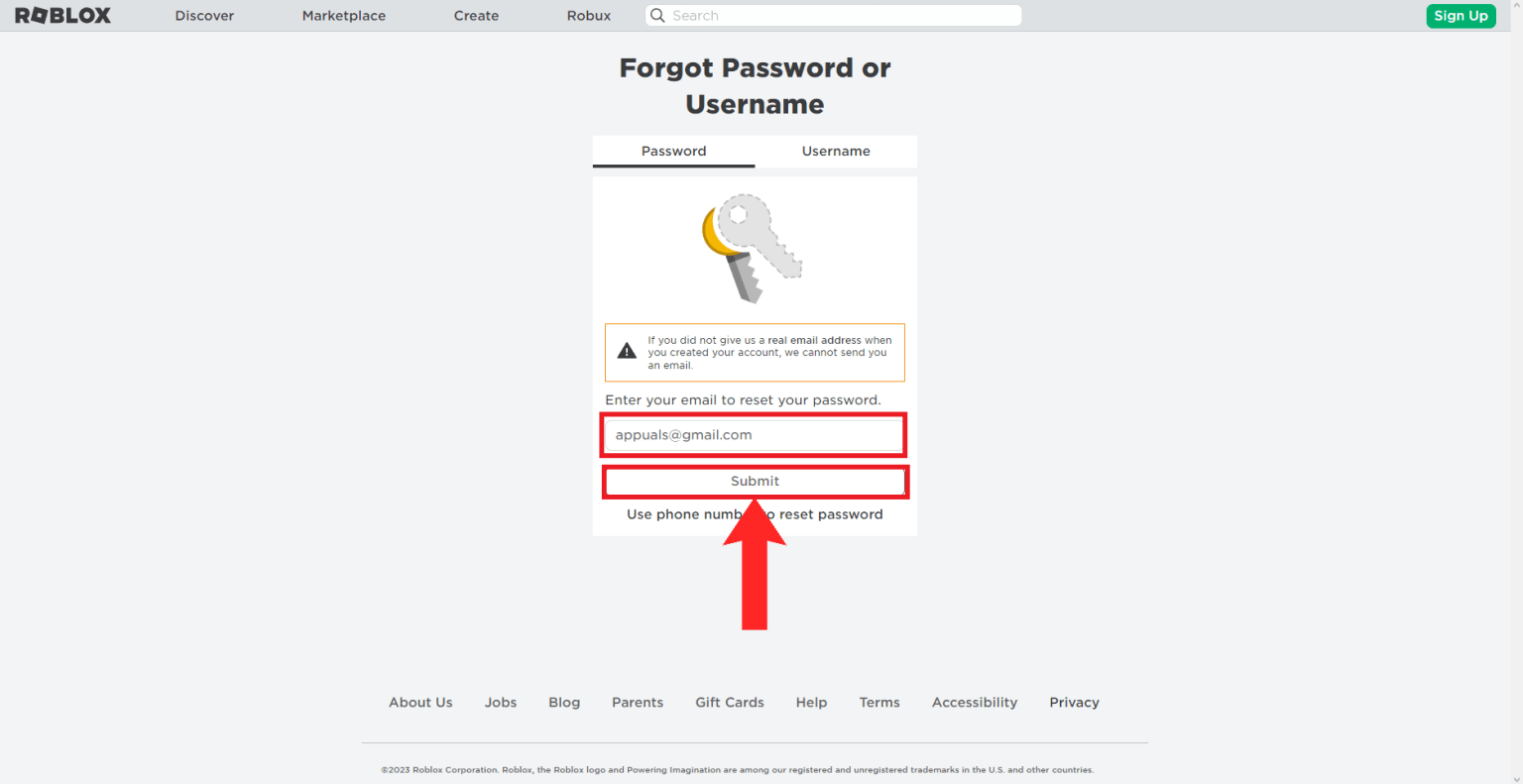
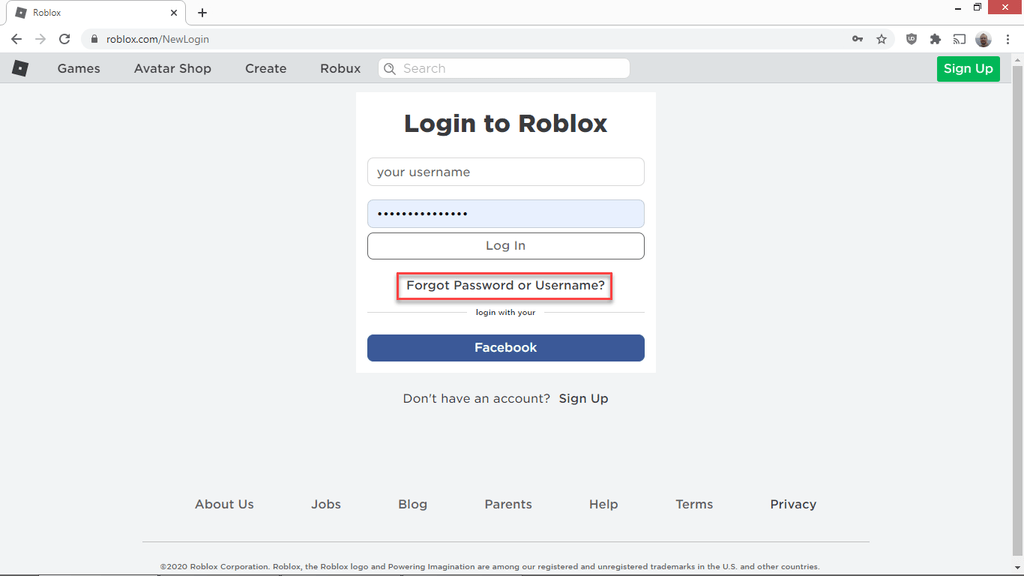
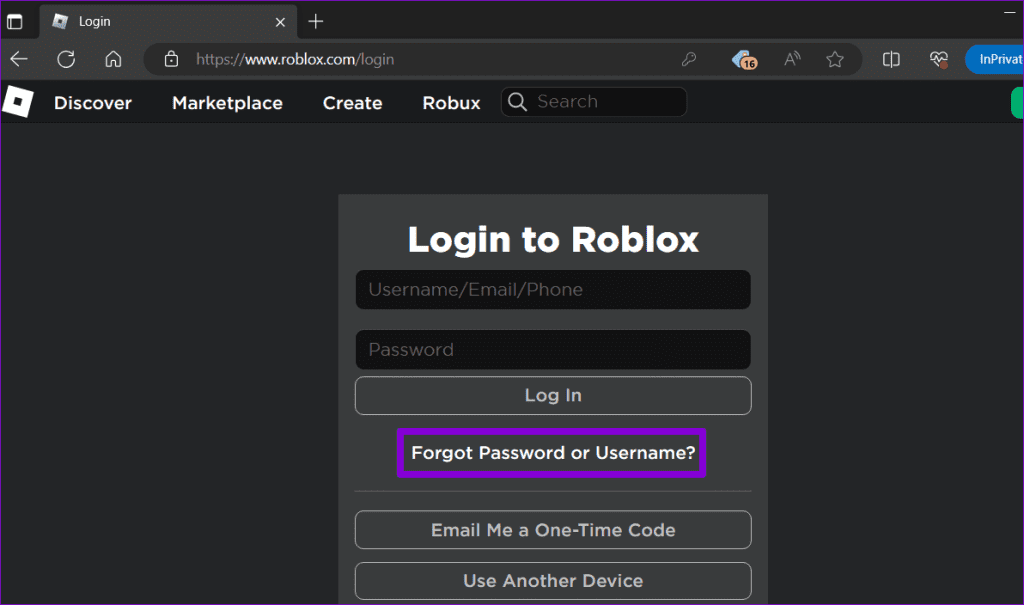
- How do I reset my Roblox password if I forgot it? - To reset your Roblox password, go to the login page, click 'Forgot Password or Username?', and enter your registered email or phone number. Roblox will send a reset link or code. Follow the instructions to create a new, secure password. Always check your spam folder if you don't see the email immediately.
- What if I don't have access to the email or phone linked to my Roblox account? - If you lack access to your registered email or phone, you'll need to contact Roblox Customer Support directly. Visit their official support page and submit a detailed ticket. Be prepared to provide extensive account information, like your username and past purchase details, to verify ownership for assistance.
- Can I recover my Roblox account without any contact information? - Recovering a Roblox account without registered contact information typically requires direct intervention from Roblox Customer Support. They will ask for specific details about your account to prove ownership. While challenging, providing information like old usernames, purchase history, or creation dates can help the support team verify your identity.
- How long does a Roblox password reset take? - A Roblox password reset using your registered email or phone number is generally instant, with the link or code arriving within minutes. If you must contact customer support due to unavailable contact info, the resolution process might take several business days, depending on their response times and verification steps.
- Is it important to enable 2-Step Verification on my Roblox account? - Yes, enabling 2-Step Verification (2SV) on your Roblox account is highly important. It adds an essential security layer by requiring a unique code, usually sent to your email or phone, in addition to your password during login. This significantly protects your account from unauthorized access, even if your password becomes compromised.
- What kind of details should I provide to Roblox Support for account recovery? - When contacting Roblox Support for account recovery, provide as many details as possible. This includes your exact username, any alternative usernames, linked email addresses or phone numbers (even if inaccessible now), approximate account creation date, and crucial evidence like receipts from Robux purchases or premium subscriptions. More information aids verification.
- What should I do to prevent forgetting my Roblox password again? - To prevent future password issues, immediately enable 2-Step Verification on your Roblox account. Use a strong, unique password, ideally generated and stored by a reputable password manager. Regularly update your registered email and phone number on your Roblox profile to ensure they are current for quick recovery.
Q: What should I do first if I forgot my Roblox password?
A: Your first step is to visit the official Roblox login page and click 'Forgot Password or Username?' Enter the email address or phone number linked to your account. Roblox will send a password reset link or a verification code to that contact method. Check your inbox, including spam, or your SMS messages, and follow the instructions to create a new, secure password.
Q: Can I recover my Roblox password without an email or phone number?
A: Recovering your Roblox password without access to your registered email or phone is challenging but possible. You'll need to contact Roblox Customer Support directly through their official support page. Be prepared to provide comprehensive details about your account, such as your username, any purchase receipts (e.g., Robux purchases), and creation date, to verify ownership and assist their team in helping you.
Q: How long does it take to reset a Roblox password?
A: If you have access to your registered email or phone number, resetting your Roblox password is almost instantaneous. The reset link or code is typically sent within seconds to minutes. If you need to contact Roblox Customer Support because you lack access to your contact information, the process can take several business days for them to review your case and respond.
Q: Is it safe to reset my Roblox password using a public computer?
A: It is generally not recommended to reset or log into your Roblox account, or any sensitive account, using a public computer or Wi-Fi network. Public systems may have security vulnerabilities or keyloggers that could compromise your new password. Always prefer using a private, secure device and network for sensitive actions like password resets to ensure your account remains safe from unauthorized access.
Q: What if I didn't receive the Roblox password reset email?
A: If you haven't received the Roblox password reset email, first check your spam or junk mail folder, as it might have been filtered there. Ensure you entered the correct email address associated with your account. You can also try requesting the reset again. If it still doesn't arrive, contact Roblox Customer Support, as there might be an issue with your account's registered email or delivery.
Q: Should I enable 2-Step Verification after resetting my password?
A: Absolutely, enabling 2-Step Verification (2SV) is highly recommended after resetting your password. This adds a crucial layer of security, requiring a unique code from your email or phone in addition to your password for login. 2SV significantly protects your Roblox account from unauthorized access, even if your password is somehow compromised in the future, enhancing overall security.
Q: How do I choose a strong new Roblox password?
A: When creating a strong new Roblox password, aim for a combination of uppercase and lowercase letters, numbers, and symbols. It should be at least 10-12 characters long and not easily guessable, avoiding personal information like birthdays or common words. Consider using a passphrase (e.g., "GamingIsFunIn2026!") or a password manager to generate and securely store complex passwords, ensuring robust protection for your account.
In the fast-paced world of 2026, where digital identities are as crucial as real-world ones, forgetting a password can feel like a major roadblock. Especially when it comes to Roblox, the immersive platform where millions of Americans spend hours building, playing, and socializing. If you've found yourself locked out of your virtual kingdom because your Roblox password has mysteriously vanished from your memory, don't panic! We've all been there. The good news is that regaining access to your Roblox account is typically a straightforward process, designed with user convenience and security in mind. This guide will walk you through every step, ensuring you get back to your favorite experiences without unnecessary stress or delay.
Forget the old days of endless loops and frustrating support tickets. Roblox has refined its account recovery mechanisms, making them more efficient and user-friendly than ever. Whether you're a seasoned player or a parent trying to help a child access their account, understanding the proper channels is key. Let's dive into exactly what you need to do.
How to Successfully Recover Your Forgotten Roblox Password
The primary method for recovering your Roblox password hinges on the information you provided when you first created your account. This usually involves an email address or a phone number. Ensure you have access to whichever one you used.
Utilizing the Email or Phone Number Reset
This is the most common and quickest way to reset your password. Here’s how:
- Go to the official Roblox login page.
- Click on the 'Forgot Password or Username?' link. This link is usually located just below the login fields.
- You'll be prompted to enter either your email address or your phone number associated with your Roblox account. Input the correct information.
- Roblox will then send a password reset link to your email or a verification code to your phone.
- Check your inbox (and spam folder!) for the email, or your phone for the SMS.
- Click the link or enter the code to set a brand new password. Make sure your new password is strong and unique!
It's vital to use an email address or phone number that you actively monitor. If you no longer have access to the original email or phone, the process becomes slightly more complex, but not impossible.
What If You Don't Have Access to Your Registered Email or Phone?
This scenario is a common pain point for many users. If you've changed your email, lost your phone, or simply can't remember which contact method you used, you might feel stuck. However, Roblox offers additional avenues for support.
- Check for linked accounts: Some users might have linked their Roblox account to a social media platform or Google. While not a direct password reset, it can sometimes help verify identity if you need to contact support.
- Contact Roblox Support: If all else fails, reaching out to Roblox Customer Support is your next best step. You can submit a support ticket through their official website. Be prepared to provide as much detail as possible about your account to prove ownership. This could include your username, any past purchase receipts (Robux purchases are great for verification), and the approximate date your account was created. While this process takes longer, typically a few business days for a response, it is often effective.
Pro Tips for Account Security and Future Prevention
Once you've regained access, take a moment to fortify your account. The digital landscape is always evolving, and proactive security measures are your best defense.
- Enable 2-Step Verification (2SV): This is a game-changer. With 2SV, even if someone gets your password, they can't log in without a code sent to your email or phone. It's a crucial layer of security that every Roblox player should activate.
- Use a Password Manager: Consider using a reputable password manager. These tools securely store all your passwords, generate strong unique ones, and can auto-fill login details, eliminating the need to memorize complex strings. Popular options include LastPass, 1Password, and Bitwarden.
- Regularly Update Contact Info: Always ensure your email address and phone number on file with Roblox are current. This makes future password recovery seamless.
- Be Wary of Phishing: Roblox will never ask for your password outside of their official login pages. Be extremely cautious of suspicious links or messages promising free Robux or special items, as these are often scams designed to steal your credentials.
Regaining access to your Roblox account after forgetting your password doesn't have to be a daunting task. By following these clear steps and implementing strong security practices, you can enjoy your Roblox adventures with peace of mind. Remember, your digital safety is paramount, and taking a few moments to secure your account can save you hours of frustration down the line. Happy gaming!
Roblox account recovery, forgotten password steps, email reset, phone recovery, contacting Roblox support, regaining game access, securing your account.
35



How To Find Your Roblox Password For 2026 Robfp7 1536x791 . How Do You See Your Roblox Password Information Forgot Roblox Password . How To Reset Your Roblox Password In 8 Easy Steps Guide Robfp2 1536x791 . How To Reset Forgotten Roblox Password Full Guide YouTube . How To Reset Roblox Password If You Forgot It 2026 YouTube




Roblox PW Reset Quick Amp Easy Guide . How To Reset And Change Your Roblox Password 7fa517f7 638c 4bf2 B2ba. How To Change Your Roblox Password Or Reset Your Roblox Password 1024 80 . How To Reset Your Roblox Password Without Email 2025 Get Your . Forgot Roblox Password Here Are Three Ways For You To Reset It MiniTool Forgot Roblox Password 1


4 Fixes For Roblox Not Letting Me Log In Guiding Tech Reset Roblox Password 1024x605 . How To See Your Roblox Account Password If You Forgot It Recover . Roblox Password Reset Your Quick Guide . Lost Roblox Password How To Find Yours In 2026 . Lost Roblox Password How To Find Yours In 2026


How To Reset And Change Your Roblox Password 077a11a8 Cb60 4337 84cd. Roblox Lost Password How To Find Out Your Roblox Password If You How To Reset Roblox. 4 Fixes For Roblox Not Letting Me Log In Guiding Tech Reset Roblox Account Password Email . Roblox PW Reset Quick Amp Easy Guide Change Your Roblox Password Step 14 . Lost Your Roblox Password How To Recover It Now


How To Find Your Roblox Password For 2026 4 Reset Password. How To Reset Roblox Without Resetting MMGO . 4 Ways To Reset Roblox Password Specify The Issue . Hey Google What Is My Roblox Password At Michael Stover Blog . What Happens If You Forget Your Roblox Password YouTube


How To Reset Your Roblox Password In 8 Easy Steps Guide Robfp3 1536x793 . How To Find Your Roblox Password For 2026 . How To Reset Your Roblox Password In 8 Easy Steps Guide Robfp1 . How Do You See Your Roblox Password Information . Roblox Password Lost Dont Panic Forgot Roblox Password 3


How To Reset Roblox Password Full Guide YouTube . How To Find Your Roblox Password For 2026 . Hey Google What Is My Roblox Password At Michael Stover Blog . How To Reset Forgot Roblox Password YouTube . Roblox Reset Password Step By Step Guide To Secure Your Account Guide Roblox Password Reset Guide 1